
No single product keeps a small business safe. Insurers and NIST guidance point at the same handful of controls, and each one is a different kind of software. This page lists the layers, shows published 2026 prices for well-known options in each, and tells you what to buy first.
Quick answer: The best cybersecurity software for a small business is a stack of five layers: multi-factor authentication, a password manager, endpoint protection (EDR), tested backups and security awareness training. For endpoint protection, Microsoft Defender for Business is listed at $3 per user a month; for passwords, Bitwarden Teams is $4 per user a month; and Duo offers free MFA for up to 10 users. Buy the layer you are missing first, usually MFA, then endpoints.
Key takeaways
- Think layers, not products. MFA, passwords, endpoints, backups and training each stop a different kind of attack.
- Prices are low per user. The published entries below start at $0 to $9 per user, device or endpoint a month.
- Check minimums. Some tools only sell to larger teams; for example, Huntress lists a 50-seat minimum for direct customers.
- We have not hands-on tested these products. This is a comparison of vendor-published prices and features. Treat prices as list prices that change.
On this page: The stack · Prices · MFA · Passwords · Endpoints · Backup · Training · What to buy first · FAQ
What cybersecurity software does a small business need?
Five layers cover the basics that NIST’s small business guidance and cyber insurers ask about:
| Layer | What it does | What goes wrong without it |
|---|---|---|
| Multi-factor authentication | Adds a second proof when someone signs in | A stolen password is enough to take over email |
| Password manager | Creates and stores unique passwords | Reused passwords spread one breach to every account |
| Endpoint protection (antivirus, EDR) | Detects and blocks malware and attacker activity on devices | Ransomware runs unnoticed |
| Backup | Keeps a restorable copy of your data | A failed restore means paying or closing |
| Awareness training | Teaches staff to spot scams | Staff approve fake invoices and logins |
Insurers ask for the same controls. See cyber insurance requirements and run the free readiness check.
Published prices at a glance
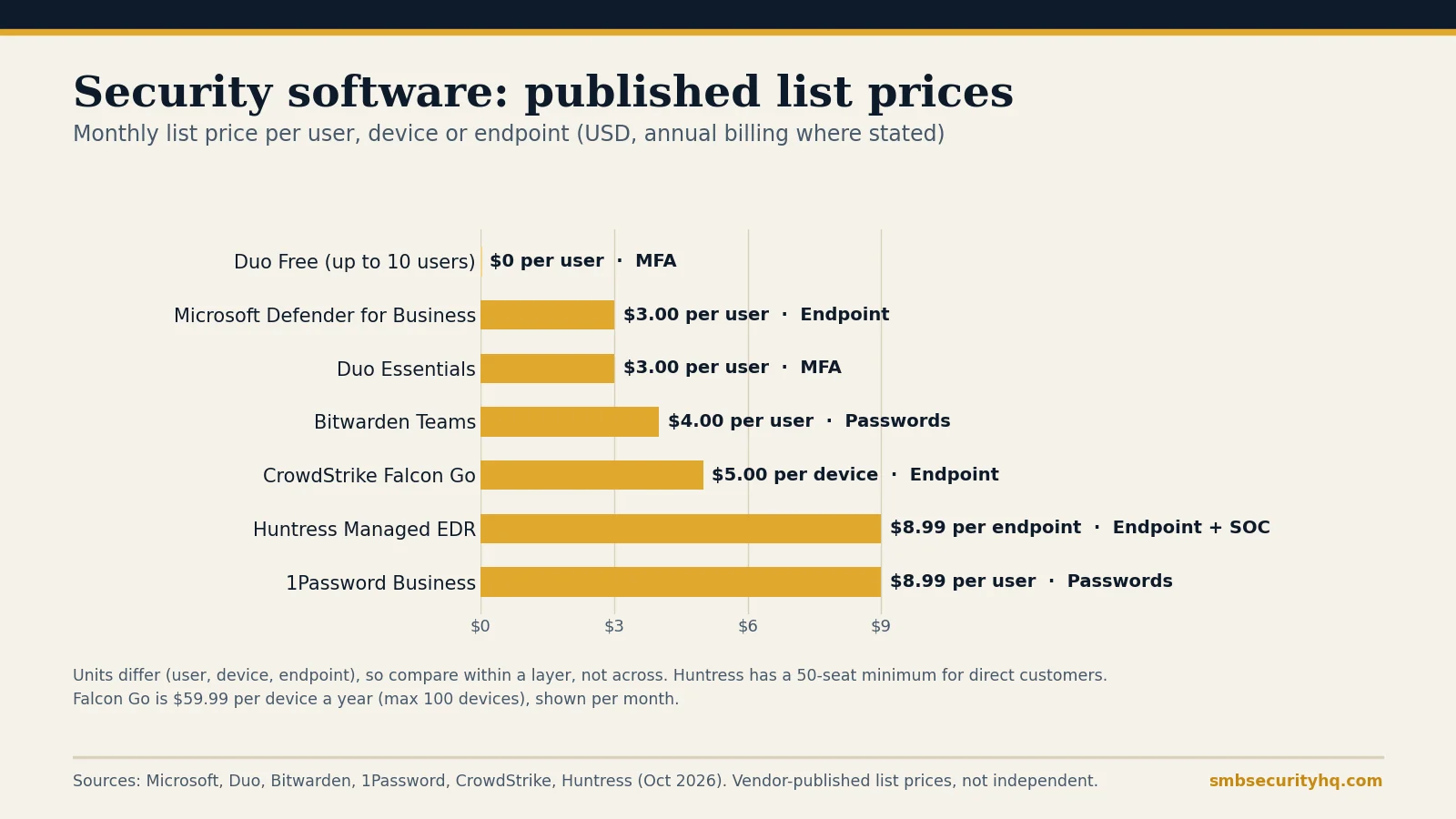
| Layer | Product | Published price | Notes |
|---|---|---|---|
| MFA | Duo Free | $0, up to 10 users | Basic MFA and an authenticator app |
| MFA | Duo Essentials | $3 per user a month | Adds SSO and passwordless sign-in; licenses sold in blocks of 10 under 100 users |
| Passwords | Bitwarden Teams | $4 per user a month, billed annually | Sharing, audit logs, directory sync |
| Passwords | 1Password Business | $8.99 per user a month, billed yearly | Teams Starter Pack is $24.95 a month for up to 10 users |
| Endpoint | Microsoft Defender for Business | $3 per user a month | Up to 300 users and five devices each; includes EDR |
| Endpoint | CrowdStrike Falcon Go | $59.99 per device a year | Maximum 100 devices |
| Endpoint + monitoring | Huntress Managed EDR | $8.99 per endpoint a month (list) | 50-seat minimum for direct customers |
| Backup | Backblaze Business | Lists $99 a year | Confirm whether the price is per computer |
| Training | Huntress Managed SAT | $2.08 per learner a month (list) | 50-seat minimum; see training options |
All prices come from the vendors named and are list prices, not independent measurements or negotiated quotes.
Best MFA for a small business
If you have 10 or fewer people, Duo’s free plan is the cheapest way to add MFA to supported apps, and Duo Essentials at $3 per user a month adds single sign-on and passwordless options. Most small businesses should first switch on the MFA already included in Microsoft 365 or Google Workspace for email and admin accounts, which costs nothing extra. Start there and add a dedicated product when you need one login for many apps. Plain-English background: what is MFA. Comparison: best MFA for small business.
Best password manager for a small business
Bitwarden Teams at $4 per user a month is the lower-priced option, and 1Password’s Teams Starter Pack covers up to 10 people for $24.95 a month, which works out to less than $2.50 a person. Both let you share logins without sending them in chat. See best password manager for business and 1Password vs Bitwarden.
Best endpoint protection for a small business
This is the layer with the widest price spread, and the real choice is between software and service.
- Software you run yourself. Microsoft Defender for Business at $3 per user a month includes endpoint detection and response, attack surface reduction and automated investigation, and covers up to five devices per user. CrowdStrike’s entry bundle, Falcon Go, is $59.99 per device a year for up to 100 devices.
- Software plus people. Managed EDR adds analysts who watch alerts. Huntress lists $8.99 per endpoint a month, with a 50-seat minimum for direct customers; smaller firms usually buy through an MSP.
If nobody on your team will answer an alert at night, pay for the version with people. See EDR vs antivirus, best EDR for small business and MSP vs MSSP vs MDR vs vCISO.
Bitdefender GravityZone is another common small business choice. We are not listing a price because the sources we checked gave inconsistent figures, so ask for a quote.
Best backup software for a small business
Backblaze’s business page lists $99 a year and centralized admin with no limit on workstations, but the page does not say whether that price covers one computer or several, so confirm before you budget. Whatever you pick, follow the 3-2-1 rule and test a restore: backup strategy and best cloud backup.
Security awareness training
Published list prices run from about $10 to $45 per user a year. The evidence on whether it works is mixed, so buy it as a layer, not a fix. Prices, minimum seat counts and the research are in our security awareness training guide.
What should you buy first?
Our editorial order, based on what stops the most damage per dollar:
- MFA on email and admin accounts (free in most email suites).
- A password manager for everyone.
- Endpoint protection on every computer, with monitoring if nobody can respond.
- Backups, with a tested restore.
- Training, once the technical controls are in place.
A 10-employee example stack comes to roughly $337 to $672 a month including insurance; see what cybersecurity costs. A free tick-list: small business cybersecurity checklist.
Frequently asked questions
What is the best cybersecurity software for a small business?
There is no single product. A good small business stack has MFA, a password manager, endpoint protection with EDR, tested backups and staff training.
How much does small business cybersecurity software cost?
Published list prices in this guide run from free to about $9 per user, device or endpoint a month for individual tools. A 10-employee stack is roughly $337 to $672 a month including cyber insurance.
Is Microsoft Defender enough for a small business?
Microsoft lists Defender for Business at $3 per user a month with EDR included. Whether it is enough depends on whether someone will watch and respond to alerts; if not, consider a managed service.
Do I need antivirus if I have EDR?
Modern EDR products include antivirus protection. You do not need to run both, and running two can cause conflicts.
Is free cybersecurity software good enough?
Free tools such as Duo Free (up to 10 users) cover some layers, but free plans have limits on users and features. Check them against your size and your insurer’s requirements.
Which cybersecurity tools do cyber insurers want?
Insurers ask about MFA, endpoint detection and response, backups and training. See our guide to cyber insurance requirements.
Sources
- Microsoft: Security pricing for small and medium business (checked Oct 9, 2026)
- CrowdStrike: Falcon pricing (checked Oct 9, 2026)
- Duo: Editions and pricing (checked Oct 9, 2026)
- Bitwarden: Business pricing (checked Oct 9, 2026)
- 1Password: Business pricing (checked Oct 9, 2026)
- Huntress: Pricing (checked Oct 9, 2026)
- Backblaze: Business backup pricing (checked Oct 9, 2026)
- NIST: Small Business Cybersecurity Quick-Start Guides (updated Sept 16, 2026)
Last updated October 9, 2026. Prices are vendor-published list prices and change often; they are not independent surveys or negotiated quotes. SMB Security HQ provides general information, not legal, financial or professional security advice. This page contains no affiliate links at the time of writing; if that changes, links will be marked. See our Affiliate Disclosure and How We Test.