
A password alone is easy to steal, guess or reuse. Multi-factor authentication (MFA) adds a second check so a stolen password is not enough. It is one of the cheapest controls a small business can switch on, and one that cyber insurers ask about first.
Key takeaways
- MFA stops most password-only takeovers. If a password leaks, the attacker still needs the second factor.
- Not all MFA is equal. Security keys and passkeys resist phishing; SMS codes do not.
- Start with email. If an attacker controls your email, they can reset almost everything else.
- It is often free. Microsoft 365, Google Workspace and many business apps include it, and Duo Free covers up to 10 users.
On this page: What it is · Methods ranked · Which accounts first · Rollout · Common problems · Insurance · FAQ
What is multi-factor authentication?
MFA asks for two or more different kinds of proof: something you know (a password), something you have (a phone or security key) and something you are (a fingerprint or face). A criminal who buys your password on the dark web or tricks you into typing it into a fake page still cannot sign in without the second factor. CISA’s consumer guidance describes the common types as codes sent by text or email, authenticator apps that generate a new code every 30 seconds, and biometrics.
Which MFA methods are strongest?
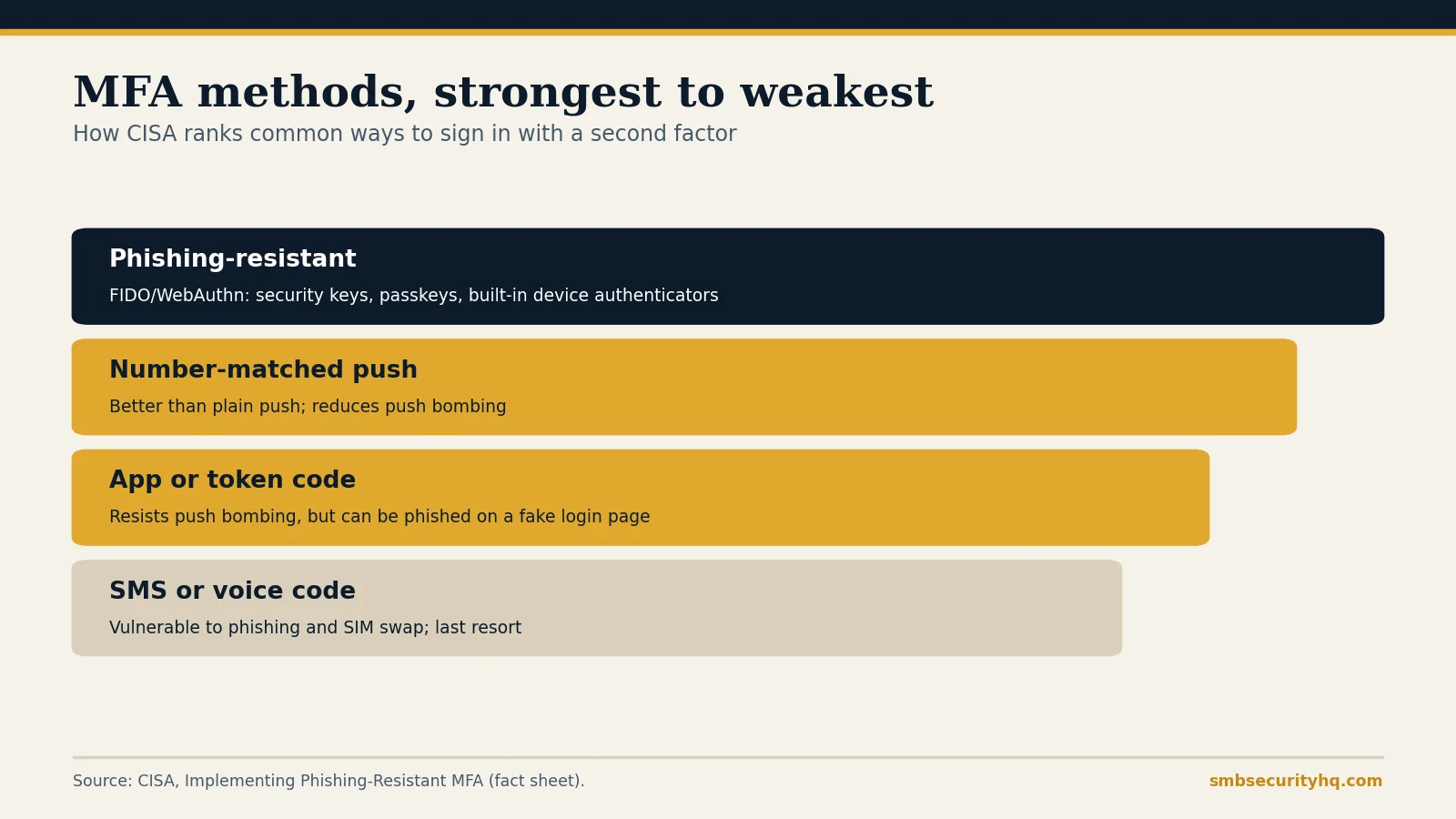
| Method | How it holds up | Notes |
|---|---|---|
| Phishing-resistant (FIDO/WebAuthn security keys, passkeys, built-in device authenticators) | Strongest | CISA calls it the “gold standard”; it cannot be tricked by a fake login page |
| Push with number matching | Good fallback | You type a number shown on the login screen, which reduces push-bombing |
| App or token codes | Good fallback | Resists push-bombing, but a code can be typed into a fake page |
| Plain push notifications | Weaker | Vulnerable to “push bombing,” where attackers flood you with prompts until one is accepted |
| SMS or voice codes | Weakest | Vulnerable to phishing, SIM swapping and interception; CISA says last resort |
CISA’s advice for businesses: move to phishing-resistant MFA over time, starting with email and single sign-on and with high-value users such as administrators. Where that is not possible yet, use app or token codes or number-matched push, which CISA identifies as the best options for small and medium businesses, and add other controls. Any MFA, even SMS, is better than none.
Which accounts need MFA first?
- Email (owner, finance and admin mailboxes first). Email is the reset route for everything else.
- Admin accounts for Microsoft 365, Google Workspace, your website and domain registrar.
- Banking and payment platforms.
- Remote access (VPN, remote desktop, remote management tools).
- Cloud apps with customer data (CRM, accounting, practice management).
- Password manager, so one login does not unlock everything.
- Everyone else, including part-timers and contractors.
How do you roll out MFA in a small business?
- List your accounts (our 12-step checklist starts with the inventory).
- Check what you already have. Your email suite probably includes MFA. Turn it on in the admin console and require it for everyone.
- Pick a method. Authenticator apps are a good default; buy two security keys for admins if you can.
- Set up recovery before enforcing: backup codes stored safely, and a named person who can reset access.
- Switch on in stages: admins first, then finance, then everyone, with a deadline.
- Block legacy sign-in methods that bypass MFA, where your platform allows it.
- Write it down in your policy: security policy generator.
Pair MFA with a password manager: best password manager for business. Free and low-cost options are in best cybersecurity software for small business; Duo lists a free plan for up to 10 users and Essentials at $3 per user a month.
What problems should you expect?
- Lost phone. Plan recovery in advance; do not let a reset be as easy as the attack you are blocking.
- Shared accounts. Replace them with named accounts, or put the shared login in a password manager with MFA.
- Prompt fatigue. Number matching and security keys reduce it. Train staff to deny prompts they did not start and to report them.
- Older systems that cannot do MFA. Escalate to the owner, restrict access to those systems and plan a replacement.
- MFA is not a force field. Attackers can still trick people into approving prompts or typing codes into fake sites. See how to spot a phishing email.
Do cyber insurers require MFA?
MFA is among the controls insurers most often ask about on applications, especially for email, remote access and admin accounts. Answering “no” can raise your price or block cover. See cyber insurance requirements and check where you stand with the free readiness check.
Frequently asked questions
What is MFA in simple terms?
It is a second check at sign-in, such as a code from an app or a security key, in addition to your password.
Is MFA the same as two-factor authentication?
Two-factor authentication (2FA) is MFA with exactly two factors. The terms are often used interchangeably.
What is the best MFA method for a small business?
Phishing-resistant MFA, such as security keys or passkeys, is strongest. CISA names app or token codes and number-matched push as the best fallbacks for small and medium businesses.
Is SMS MFA safe enough?
It is better than no MFA, but CISA calls SMS and voice codes a last resort because of phishing, interception and SIM-swap attacks.
Is MFA free?
Often. Many email and productivity suites include it, and Duo lists a free plan for up to 10 users. Hardware security keys cost extra.
Can MFA be bypassed?
Yes, by tricking users into approving prompts or entering codes on fake pages. Phishing-resistant methods and staff training reduce the risk.
Sources
- CISA: Implementing phishing-resistant MFA (fact sheet)
- CISA: Secure Our World, Turn on MFA
- Duo: Editions and pricing (checked Oct 9, 2026)
Last updated October 16, 2026. SMB Security HQ provides general information, not legal, financial or professional security advice. See our Affiliate Disclosure and How We Test.