

Nonprofits hold donor records, client details and payment data, usually with small teams, volunteers and shared devices. The basics are the same as for any small business, and several of the best ones are free or heavily discounted for nonprofits.
Key takeaways
- Use the nonprofit offers. Google and Microsoft both publish nonprofit pricing, and one of Microsoft’s tiers is free.
- MFA first. It costs nothing in most email suites and blocks the most common account takeovers.
- Control volunteer access. Give volunteers their own accounts, limited access, and remove them when they leave.
- Prices change. Figures below are vendor-published (Oct 2026) and need eligibility checks.
On this page: Why nonprofits are targets · Prices · The basics · Volunteers · First 90 days · Insurance · FAQ
Why do nonprofits need cybersecurity?
A donation page, a donor list and a bank account are what attackers look for, and small teams rarely have anyone watching. A fake invoice, a changed bank detail or a stolen email login can cost a year of fundraising. Funders, boards and insurers also increasingly ask what controls are in place. Verizon’s 2026 Data Breach Investigations Report says the human element was involved in 62% of breaches, which is why the habits in this guide matter as much as the tools.
What free and discounted tools exist?
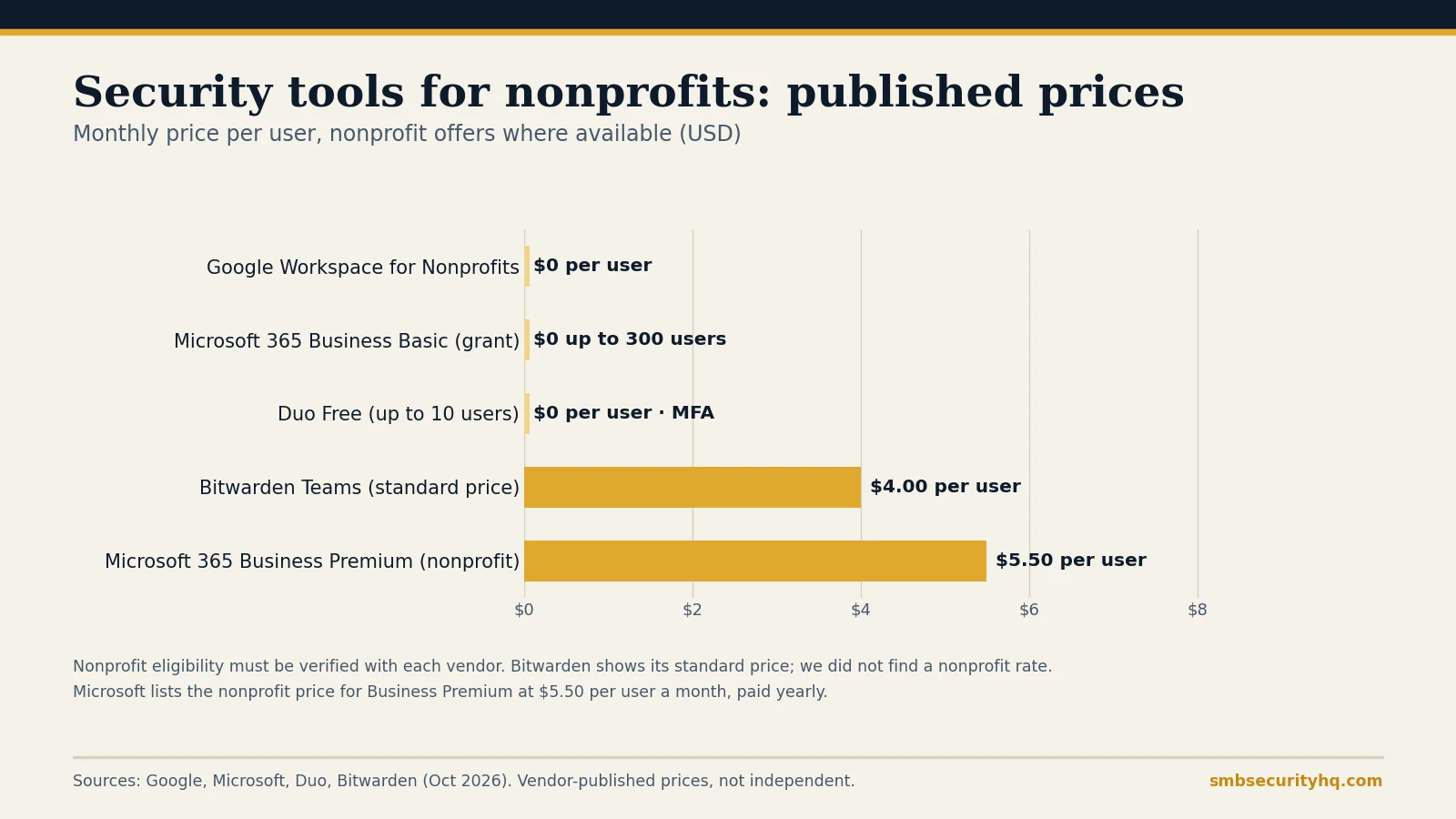
| Tool | Published price | Notes |
|---|---|---|
| Google Workspace for Nonprofits | $0 per user a month | Up to 2,000 users; eligibility verified by Google |
| Microsoft 365 Business Basic (nonprofit grant) | Free up to 300 users | Microsoft’s nonprofit offers page |
| Microsoft 365 Business Premium (nonprofit) | $5.50 per user a month, paid yearly | Microsoft’s nonprofit offers page |
| Duo Free | $0, up to 10 users | MFA for supported apps |
| Bitwarden Teams | $4 per user a month, billed annually | Standard price; we did not find a nonprofit rate |
We could not confirm nonprofit pricing for 1Password, so check its nonprofit page directly. Eligibility rules (usually registered charity status and documentation) differ by vendor. See best cybersecurity software for small business for the full-price options.
What are the basics for a nonprofit?
- Turn on MFA for email, donor database, bookkeeping and the bank. See what MFA is.
- Use a password manager instead of shared spreadsheets or sticky notes: best password manager for business.
- Keep everything updated. Turn on automatic updates for computers, phones and your website platform.
- Back up and test restores. Donor data should exist in two places, one isolated: backup strategy.
- Protect devices with endpoint protection. Microsoft lists Defender for Business at $3 per user a month for small organizations: endpoint protection vs antivirus.
- Verify payment changes by phone on a known number: business email compromise.
- Train staff and volunteers on scams that target charities: security awareness training.
- Write a one-page incident plan with who to call, including your insurer and your board chair: incident response plan template.
How do you handle volunteers and shared devices?
Volunteers are often the biggest gap. Give each one a named account, never a shared login. Limit access to what the role needs, use MFA, and switch off the account the day they leave. Prefer your organization’s accounts and cloud files over personal email and USB sticks, and keep donor and client data off personal devices where you can.
What can a nonprofit do in the first 90 days?
- Month 1: MFA on email and finance, password manager for staff, list who has access to what.
- Month 2: updates on, endpoint protection on every computer, backups running with a restore test.
- Month 3: short training for staff and volunteers, a written incident plan and a payment-change rule.
For a tick-list use our 12-step checklist or the 30-day plan, and draft your written policies with the security policy generator.
Should a nonprofit buy cyber insurance?
If you hold donor or client data or move money online, ask your broker. Insurers usually ask about MFA, endpoint protection, backups and training, so the steps above also help you qualify: cyber insurance requirements and the free readiness check. Some nonprofits already have a bundled policy through a board or umbrella insurer, so check before buying another.
Frequently asked questions
What is the cheapest way for a nonprofit to improve cybersecurity?
Turn on MFA, use a password manager, enable automatic updates and test your backups. These cost little or nothing and address the most common attacks.
Is Google Workspace free for nonprofits?
Google lists Google Workspace for Nonprofits at $0 per user a month, for verified nonprofits, with a limit of 2,000 users.
Does Microsoft offer free Microsoft 365 for nonprofits?
Microsoft lists a Business Basic grant that is free for up to 300 users, and Business Premium at $5.50 per user a month. Eligibility must be confirmed with Microsoft.
Do volunteers need MFA?
Yes, if they can access email, donor data or finances. Give them their own accounts and remove access when they leave.
Do nonprofits need cyber insurance?
Not by law, but a breach can bring notification costs and downtime. Ask your broker whether your current policy covers cyber events.
Where can a nonprofit get help for free?
Ask your IT volunteer or a local managed provider about pro bono or discounted help. We did not find a free government scanning program that lists nonprofits as eligible, so check eligibility before applying.
Sources
- Google for Nonprofits: Workspace offer (checked Oct 16, 2026)
- Microsoft: Technology grants and discounts for nonprofits (checked Oct 16, 2026)
- Duo: Editions and pricing; Bitwarden: Business pricing; Microsoft: Security pricing for small and medium business
- Verizon: 2026 Data Breach Investigations Report
Prices are vendor-published and change often; nonprofit eligibility must be verified with each vendor. SMB Security HQ provides general information, not legal, financial or professional security advice. See our Affiliate Disclosure and How We Test.