
You do not need a security team to get most of the benefit. You need a short list, done in the right order. These ten tips cover the habits and tools that matter most for a business with no dedicated IT.
Key takeaways
- Start with accounts. MFA and a password manager shut the door attackers use most.
- Back up and test. An untested backup is a hope, not a plan.
- Verify money requests. Business email compromise is a leading cause of insurance claims.
- Write it down. A one-page plan beats improvising during an incident.
On this page: The 10 tips · Why these · Next steps · FAQ
What are the best cybersecurity tips for a small business?
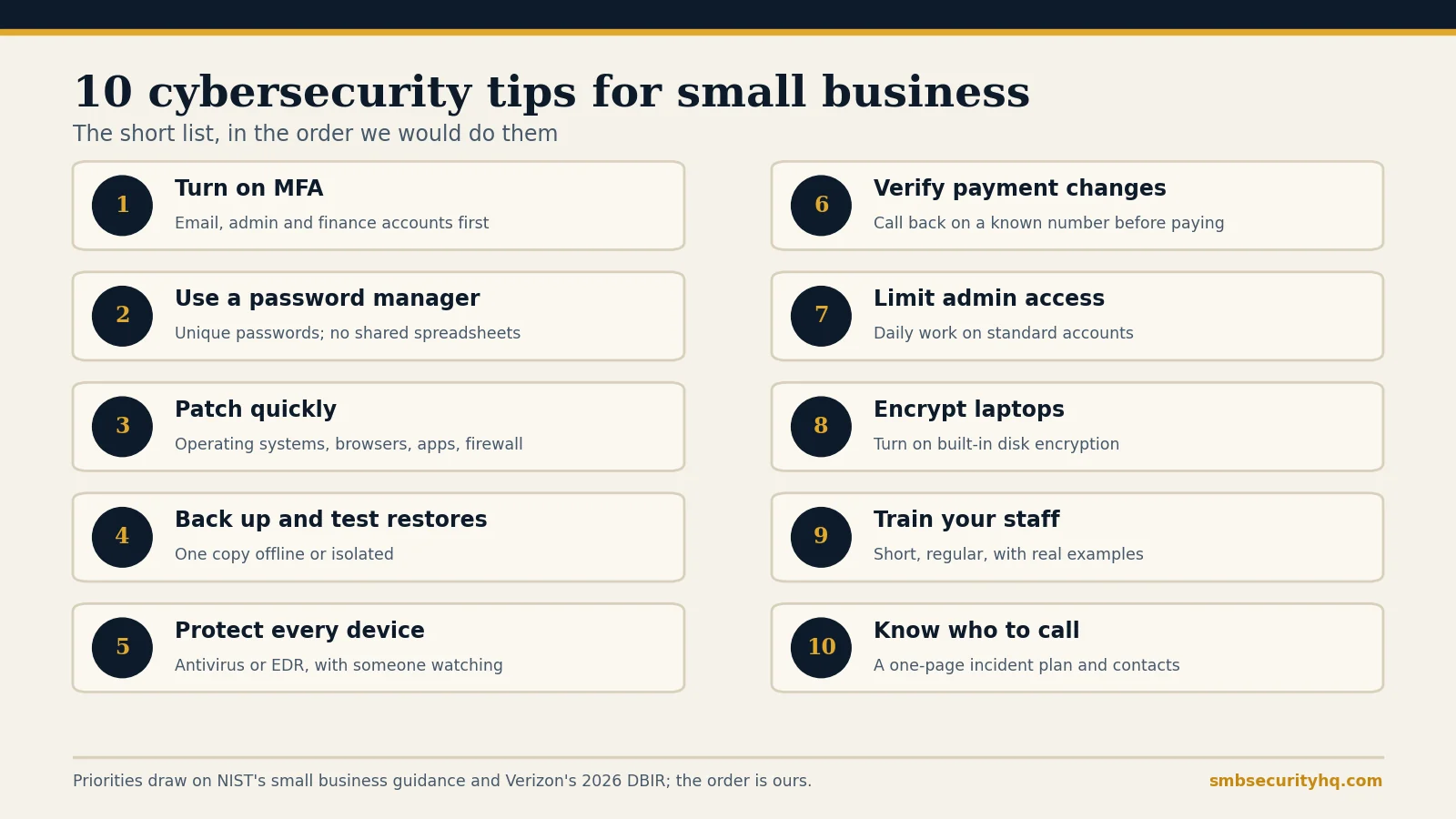
1. Turn on multi-factor authentication
Start with email, admin, finance and remote-access accounts. A stolen password alone is then not enough. Many email suites include MFA at no extra cost. See what MFA is.
2. Use a password manager
Give every person a manager so each account has a unique password and nobody shares logins in chat or spreadsheets. Published business plans start around $4 per user a month: see best cybersecurity software for small business.
3. Patch quickly
Update operating systems, browsers, apps, routers and firewalls. Verizon’s 2026 DBIR found vulnerability exploitation was the most common way in, at 31% of breaches, and that only 26% of critical known-exploited vulnerabilities were fully fixed in 2025. Turn on automatic updates wherever you can.
4. Back up your data and test the restore
Keep at least one copy offline or isolated from your network so ransomware cannot reach it, and restore a file on a schedule to prove it works. See the 3-2-1 backup rule.
5. Protect every device
Run antivirus or, better, endpoint detection and response on every business computer, and make sure someone watches the alerts. See endpoint protection vs antivirus.
6. Verify payment changes by phone
Any request to change bank details or send an urgent payment gets a call-back on a number you already hold, never one from the email. Coalition reports that business email compromise and funds transfer fraud made up 58% of its 2026 incidents. See business email compromise.
7. Limit admin access
Give staff standard accounts for daily work and keep admin rights for the few who need them. If one account is compromised, the damage stays smaller.
8. Encrypt laptops and phones
Turn on the built-in full-disk encryption in Windows and macOS so a lost laptop is an inconvenience, not a breach.
9. Train your staff on real scams
Keep sessions short and regular, with real examples: fake invoices, fake sign-in pages and impersonation of the boss. Be realistic about it: a large 2025 study found annual training alone did not reduce phishing clicks, so rely on tips 1 to 5 first. See security awareness training options and pricing and how to spot a phishing email.
10. Know who to call
Write a one-page incident plan: who decides, who to call (your IT provider, your insurer, a lawyer), and the first steps. Keep a printed copy. Check what your policy requires first: cyber insurance requirements.
Why these ten?
They are the controls that show up in NIST’s small business guidance and in what insurers ask for. We put accounts and backups first because they prevent the most common takeovers and make recovery possible. The ranking is our editorial judgment, not a measured score. Verizon’s 2026 DBIR also reports that the human element was involved in 62% of breaches, which is why tips 6 and 9 are about people as well as tools.
What should you do next?
- Tick off the full list with our 12-step cybersecurity checklist.
- Turn the tips into a schedule with the 30-day cybersecurity plan.
- Draft your written policies with the security policy generator.
- Check where you stand for insurance with the free readiness check.
- Budget it: what cybersecurity costs.
Frequently asked questions
What is the most important cybersecurity tip for a small business?
Turn on multi-factor authentication for email, admin and finance accounts. It stops a stolen password from being enough to take over an account.
How can I protect my small business from hackers for free?
MFA, automatic updates, built-in disk encryption, changing default passwords and a written incident plan cost time rather than licences. See our cost guide.
How do I protect my business from phishing?
Use MFA, verify payment requests by phone, report suspicious emails and train staff on real examples. Training alone is not enough, so pair it with technical controls.
How often should I back up my business data?
As often as you can afford to lose data: daily for most small businesses. Test a restore on a schedule so you know it works.
Do small businesses really get attacked?
Yes. Attackers target small businesses because defenses are often thinner. Coalition’s 2026 claims report puts the average cyber insurance claim at $116,000.
Do I need an IT professional?
Not for the first steps, but if nobody can respond to alerts or manage devices, an MSP or managed security provider can help. See MSP vs MSSP vs MDR vs vCISO.
Sources
- Verizon: 2026 Data Breach Investigations Report; Help Net Security summary (May 25, 2026): vulnerability exploitation 31%, human element 62%, 26% of critical KEV fixed
- NIST: Small Business Cybersecurity Quick-Start Guides (updated Sept 16, 2026)
- HR Dive: Employees don’t learn anything from phishing training, research says (Sept 23, 2025)
- Coalition: 2026 Cyber Claims Report (BEC and funds transfer fraud 58% of incidents; average claim $116,000)
Last updated October 9, 2026. SMB Security HQ provides general information, not legal, financial or professional security advice. See our Affiliate Disclosure and How We Test.
Written by SmbSecurity team. Reviewed by Nhon Dang, CTO.